


Complete Install of Navigation in I35 *PICTS*
 10-09-2009, 07:41 AM
#81
Senior Member
Thread Starter

Join Date: May 2007
Location: Atlanta, GA
Posts: 652
Nice!! Thanks for the response! I guess I will have some fun time this weekend  )
)
Well, speaking of the wheel controls, I have to disagree a bit with you. It would've been the case a couple of months ago when I started to project my very own CarPC, but just ten days ago I discovered the greatest invention of all - the Soundgate AUXNISSV3, which you can still buy on ebay!!)
So, as a result now I am not planning to remove the Stock Bose and saving tons of money (well, relatively)! Instead, I'm going to use my laptop, which I'm putting it under the seat and plugging it into a 400w power inverter, which is powered through the rear cig outlet. So, the gps is connected through usb (i heard that bluetooth gets weird from time to time), and an external antenna through a rather long wire goes through the side stand (behind the seatbelt) all the way to the moonroof - actually there is space between the glass and the car body. All the cables from the screen and the AUX are run under the console, and get out at the bottom left part of the plastic cover of the gear stick. Not the neatest way, but pretty easy to implement... And most importantly, the laptop remains portable)
Well.... that's how I plan (hypothetically) to keep my wheel controls)) I was deciphering the wheel controls and audio unit electric scheme, but I was getting into trouble, because I think that the wiring for nav and non-nav is slightly different for wheel controls... Because I think I couldn't find a similar match on a non-nav 
)Well, speaking of the wheel controls, I have to disagree a bit with you. It would've been the case a couple of months ago when I started to project my very own CarPC, but just ten days ago I discovered the greatest invention of all - the Soundgate AUXNISSV3, which you can still buy on ebay!!
)So, as a result now I am not planning to remove the Stock Bose and saving tons of money (well, relatively)! Instead, I'm going to use my laptop, which I'm putting it under the seat and plugging it into a 400w power inverter, which is powered through the rear cig outlet. So, the gps is connected through usb (i heard that bluetooth gets weird from time to time), and an external antenna through a rather long wire goes through the side stand (behind the seatbelt) all the way to the moonroof - actually there is space between the glass and the car body. All the cables from the screen and the AUX are run under the console, and get out at the bottom left part of the plastic cover of the gear stick. Not the neatest way, but pretty easy to implement... And most importantly, the laptop remains portable
)Well.... that's how I plan (hypothetically) to keep my wheel controls
)) I was deciphering the wheel controls and audio unit electric scheme, but I was getting into trouble, because I think that the wiring for nav and non-nav is slightly different for wheel controls... Because I think I couldn't find a similar match on a non-nav  10-10-2009, 04:35 PM
#82
Newbie - Just Registered

Join Date: Sep 2008
Location: Stamford, CT
Posts: 12
Sounds like its going to be a cool setup! Id love to put my stock Bose headunit back in, but then I'd lose my Navigation. If you look back a few posts, there's a gigantic pic of a stock Mazda nav system - If I can do something like that, where all I need is a screen and a remote control (whereas I can hide the nav computer in the trunk) I can put my Bose unit back where it belongs, rather than in a box under my basement steps. lol
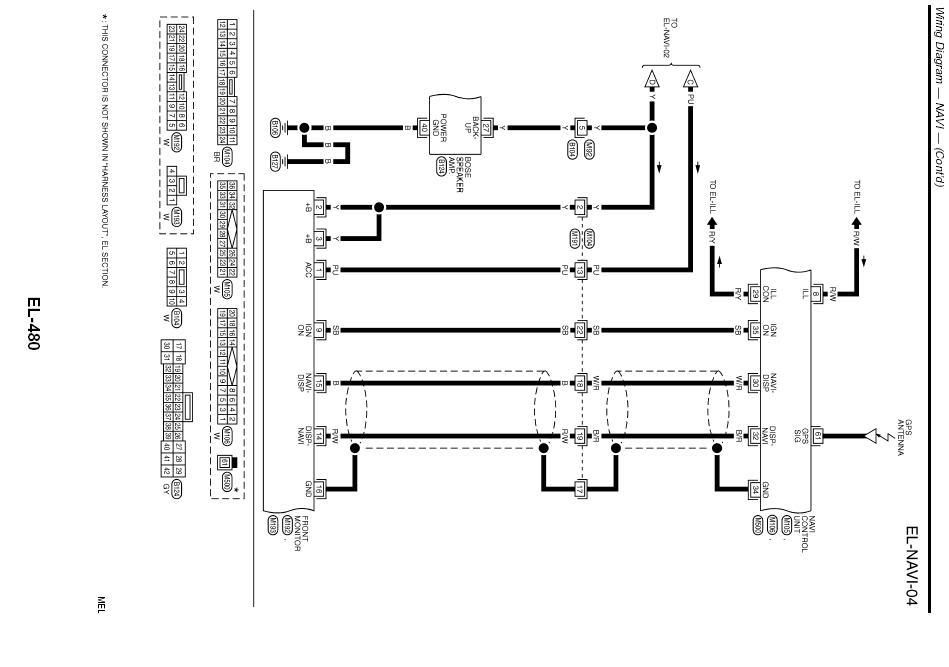
Btw, i've got a question to your previous response - you are telling me to use a yellow and yellow/black wires... but where do i find them? my screen came without harnesses at all
can you tell me a number on the harness?
I think the monitor harnesses are #192 and #193... (top left on the picture)...
Here's the picture:
SOrry, couldn't find a better quality pic
10-12-2009, 02:31 PM
#83
Senior Member
Thread Starter
Join Date: May 2007
Location: Atlanta, GA
Posts: 652
Fortunately for me, my system came with all the wires and harnesses, but I know you can order the screen harness from the dealer (for a pretty penny, I'm sure) but there's also still that car-part.com. I'm sure they've got a harness for the screen though. There's only 6 wires that come out of it (R, G, B, +,-, and a remote wire for the up/down function).
10-21-2009, 04:03 PM
#84

Fortunately for me, my system came with all the wires and harnesses, but I know you can order the screen harness from the dealer (for a pretty penny, I'm sure) but there's also still that car-part.com. I'm sure they've got a harness for the screen though. There's only 6 wires that come out of it (R, G, B, +,-, and a remote wire for the up/down function).
Whats up Z.. I've been a ghost in here since I bought my new condo in April. I'm giving up on the existing Navi and plan to gut the OEM screen and install an aftermarket VGA monitor with RCA inputs.. None of the convertor boxes out there seem to get a fixed picture on the screen without ground loop interference.. My phone (ATT Fuze has Video out and my next phone HD2 (US version) will have video out as well. Audio will route through my existing ghetto rig Aux in which I use daily...
Any screen out there that you've seen that are releatively the same size & depth needed to allow the lid to close completely? I still need to do a bit of research to package up a solution.
11-16-2009, 11:46 AM
#85
Senior Member
Thread Starter
Join Date: May 2007
Location: Atlanta, GA
Posts: 652
Nork, any updates to your nav yet?
I'm about to play again. I've had an aftermarket screen forever that is going to replace the OEM pop-up screen. It should fit exactly like the OEM screen, but I need to swap them out with some fabrication first. The one I have is even a touch screen, so I hope I can make it work properly. I found a stand-alone GPS system that should work with the screen, but I haven't bought it yet because its $400. Its got a remote and has an input for a 6 disc DVD changer. Even if the touch screen part doesn't work, the remote will be enough.
I'm about to play again. I've had an aftermarket screen forever that is going to replace the OEM pop-up screen. It should fit exactly like the OEM screen, but I need to swap them out with some fabrication first. The one I have is even a touch screen, so I hope I can make it work properly. I found a stand-alone GPS system that should work with the screen, but I haven't bought it yet because its $400. Its got a remote and has an input for a 6 disc DVD changer. Even if the touch screen part doesn't work, the remote will be enough.
 11-23-2013, 08:32 AM
#87
Newbie - Just Registered

Join Date: Nov 2013
Posts: 2
screen wont open
Hey guys,
I'm in the process of installing the nav on my 02' i35.
I have everything wired up and hooked up to a power source to test it out , not installed as yet.
The control unit seems to be working but my screen wont open, is there anyway i can test to see if it works before i install?
I'm in the process of installing the nav on my 02' i35.
I have everything wired up and hooked up to a power source to test it out , not installed as yet.
The control unit seems to be working but my screen wont open, is there anyway i can test to see if it works before i install?
11-24-2013, 06:39 PM
#88

I don't hink there's a way to test it, or at least I couldn't find a way to test it when I had the same exact issue. I don't recall the wires specifically, but I had 2 wires reversed and when I swirtched them the screen opened. It's been a while since i did this install, but I believe the wiring schematics had it backwards, or my wires were the opposite colors of the wires in the schematic. Again, it's been a while and I don;t have the schematic readily available, but the 2 wires I am referring to are the signal wires form the navi to unit to the screen.
11-29-2013, 06:33 AM
#89
Junior Member

Join Date: Jul 2008
Location: North Jerz
Posts: 83
I installed mines about 3 years ago. If you followed the wire schem from Nissan, the power + and - for the screen are backwards. I don't remember the pin number for them, but it's on the bigger harness that goes to the screen, and they are blue IIRC. Switch them and you should be good to go

Thread
Thread Starter
Forum
Replies
Last Post
The Frye
7th Generation Maxima (2009-2015)
6
09-02-2021 11:03 AM
MaxLife17
8th Generation Maxima (2016-)
43
06-27-2019 01:37 PM
Maxima30
5th Generation Maxima (2000-2003)
2
09-07-2015 06:13 PM